How to Connect an iPhone to a Samsung TV, With or Without AirPlay
Check whether your Samsung TV has AirPlay, turn it on, fix it when the TV doesn't appear, and cast videos to Samsung TVs that don't have it.
Quick answer
Samsung offers AirPlay 2 on select TVs from 2018 to 2025. Turn it on under Settings → General (Connection on 2023 and newer models) → Apple AirPlay Settings, then use Screen Mirroring or an app's AirPlay button on your iPhone. If your Samsung has no AirPlay option, CastBrowser can send compatible web and phone videos to it over DLNA, with nothing installed on the TV. If the TV doesn't show up over DLNA either, open castb.cc in the TV's Internet app and pair it with a 3-character code.
No AirPlay on your Samsung? Get CastBrowser free and cast compatible videos from your iPhone.
Does your Samsung TV have AirPlay?
According to Samsung's AirPlay support page, AirPlay 2 is available on select Samsung TV models from 2018 to 2025, and on Samsung Smart Monitors. The quickest check is on the TV itself: if Settings has no Apple AirPlay option, Samsung says the model isn't supported.
| Your Samsung TV | AirPlay? | Best way to get iPhone video on it |
|---|---|---|
| 2018–2025 model with Apple AirPlay Settings | Yes | AirPlay: Screen Mirroring or an app's AirPlay button |
| Model with no Apple AirPlay option | No | CastBrowser over DLNA |
| Tizen TV from 2015–2017 | No | CastBrowser over DLNA; media sharing may need to be on |
| AirPlay TV, website with no AirPlay button | Yes | Mirror the screen, or cast the video with CastBrowser |
| AirPlay missing and the TV doesn't appear over DLNA | No | CastBrowser Web Receiver: open castb.cc in the TV's Internet app |
How to turn on AirPlay on a Samsung TV
- On the TV, open Settings (All Settings).
- Select General. On 2023 and newer models, select Connection instead.
- Open Apple AirPlay Settings and turn AirPlay on.
The same menu has Require Code, which asks for a code the first time an iPhone connects or every time. When the TV shows a code, type it on your iPhone.
How to AirPlay from an iPhone to a Samsung TV
Connect the iPhone and the TV to the same Wi-Fi network, then choose what to send:
- Your whole screen: open Control Center, tap Screen Mirroring and choose the Samsung TV (Apple's instructions).
- A video or photo: in Photos, tap Share, then AirPlay, and pick the TV. In video and music apps, tap the AirPlay icon.
Screen mirroring puts everything on the TV, including notifications, and the phone has to stay on that screen. For longer videos, sending just the video is usually smoother. Our mirroring vs casting guide explains the difference.
AirPlay not working on your Samsung TV?
- Check the AirPlay setting. Make sure AirPlay is on in Apple AirPlay Settings. If the menu doesn't exist, your model doesn't support AirPlay; skip to the next section.
- Use the same Wi-Fi network. Samsung notes that most mobile hotspots block devices from talking to each other, even on the same network. Guest networks often do the same.
- Connect the TV to the internet. Samsung lists this as a requirement for AirPlay.
- Enter the code from the TV. If a code appears on the TV, type it on the iPhone. To clear old pairings, use Reset Paired Devices in Apple AirPlay Settings.
- No AirPlay button on the website? Many web players don't offer one. Mirror the screen, or use CastBrowser to send the detected video.
How to cast an iPhone to a Samsung TV without AirPlay
Samsung Tizen TVs include DLNA, a media-sharing standard the TV uses to play video sent over the network. CastBrowser uses it to send compatible web videos and videos stored on your iPhone. Nothing needs to be installed on the TV, and it works whether or not the TV has AirPlay.
- Install CastBrowser on the iPhone. It's free to download and needs no account. Allow Local Network access when iOS asks.
- Connect the iPhone and the Samsung TV to the same Wi-Fi network, and turn on the TV.
- Open a website in CastBrowser and start its video so the app detects it, or choose a video stored on the phone.
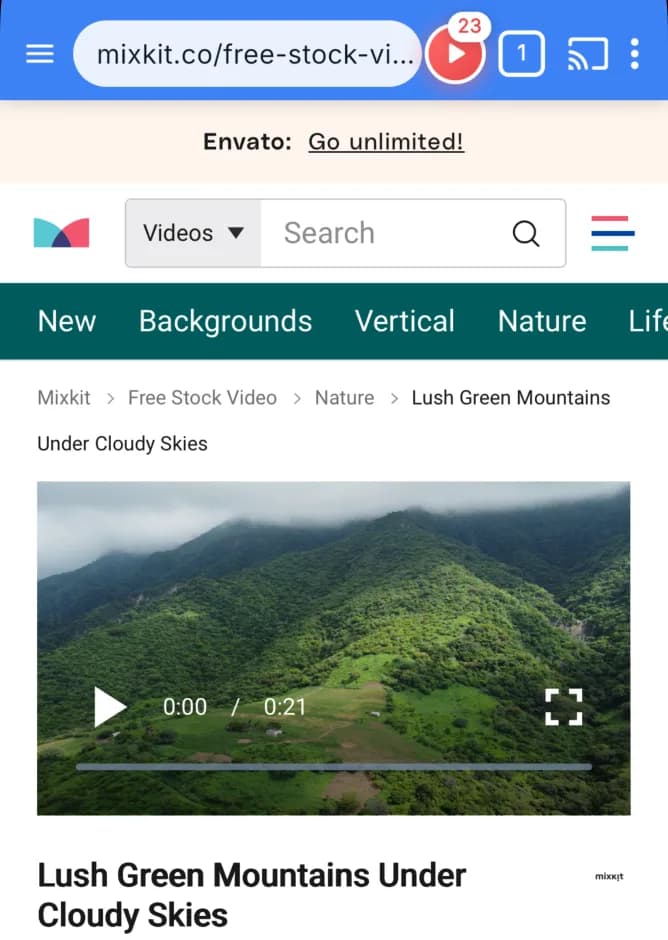

On iPhone, the red button counts the videos CastBrowser found on the page. Tap it to pick one. - Tap the cast icon and choose your Samsung TV. If the TV asks whether to allow the phone, accept.
- Use CastBrowser's controls to pause and seek. Phone volume works when the TV's DLNA renderer exposes a volume control; subtitle switching isn't available on the DLNA route.
On some 2015–2017 Samsung TVs, media sharing has to be turned on under Settings → General → Network → Expert Settings; menus vary by model. If your TV has AirPlay, CastBrowser on iPhone can also send the video through AirPlay using Apple's own device picker. More Samsung-specific setup is in our Samsung TV casting guide.
Samsung TV not showing up? Use the TV's browser
If the TV has no AirPlay and doesn't appear in CastBrowser's device list, you can still cast to it through its built-in browser. CastBrowser's Web Receiver at castb.cc turns the Samsung Internet app into the screen that plays the video:
- In CastBrowser on the iPhone, tap the cast icon and choose Web Receiver. The app shows a 3-character code.
- On the TV, open the Internet app and go to castb.cc.
- Type the code and select Connect. When the TV says Ready to cast, choose a video in CastBrowser.
The iPhone and the TV still need to be on the same Wi-Fi network. Screenshots and more detail are in the Samsung Web Receiver steps.
Ready to try it? Get CastBrowser on your iPhone.
What plays and what doesn't
- Web video: compatible MP4 files and HLS streams can be detected on a web page.
- Phone videos: choose a compatible video from Photos or Files.
- Protected services: Netflix, Disney+, Prime Video and similar protected video can't be sent from a browser. Use the service's Samsung TV app or its own AirPlay button.
- Codec limits: the TV must support the video and audio codecs inside the file. If a video fails, try another detected format.
Related guides
Get iPhone Video on Your Samsung TV
Cast compatible web and phone videos with CastBrowser, free to download with no account.